Caching Macros with WinWrap Basic for Everywhere
WinWrap® Basic for Everywhere: Macro Caching
- Manage macro lifetimes
- Application evaluates function defined by macro
- WinWrap® Basic for Everywhere Sample Implementation
WinWrap® Basic for Everywhere: Macro Caching
Sample source: ScriptCaching.zip
Special Considerations for WinWrap® Basic for Everywhere
WinWrap® Basic for Everywhere is a 100% .NET 8+ implemenation of WWB.NET.
This implementation of WWB.NET/5+ uses the Roslyn VB.NET compiler to to create in an in memory assembly
of the macro/module and all of its '#Uses modules.
Because the macros and modules are compiled execution of WWB.NET is dramatically faster than
WinWrap® Basic for COM/.NET.
However, the process of compiling the macros is significantly slower.
For small macros this speed difference overwhelms the execution speed gain.
So, it is important to avoid the parse, execute and discard cycle used by
BasicNoUIObj.RunFile.
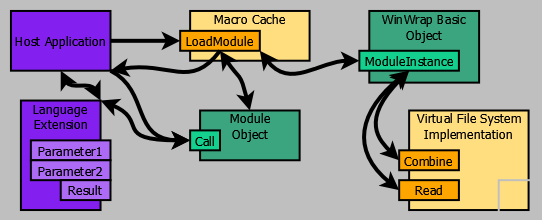
The sample code uses a macro cache to avoid the overhead incurred by RunFile.
The macro cache replaces the RunFile method with these methods and object:
The caching strategy is to hold onto previously compiled macros as long a possible using
a "most recently used" list to limit the cache size.
One important detail about caching macros is that a cached macro can't be disposed of while it is active.
(The new Module.State method is used to determine if a module is active.)
Functions implemented as Macros
In this sample macros are "function" names.
The VirtualFileSystem
is used to read macros using simple function names.
The sample could have just as easily used a data base as the macro code source.
The WWB.NET language is also extended using the following initializationg code:
// add MyLanguageExtension.Result directly to the WWB.NET language
basic_.AddSafeReference(typeof(MyLanguageExtension).Assembly, typeof(MyLanguageExtension).FullName);
and the MyLanguageExtension class:
using WinWrap.Basic.Server;
namespace MacroCaching
{
public static class MyLanguageExtension
{
public static object Parameter1;
public static object Parameter2;
public static object Result;
public static object EvaluateFunction(string macro_name, object parameter1, object parameter2)
{
Parameter1 = parameter1;
Parameter2 = parameter2;
Program.EvaluateFunction(macro_name);
return Result;
}
}
}
Performance
Before getting into the details of how the Cacheless and Cached version actually execute macros
let's look at the performance for the following macros.
Digits:
'#Language "WWB.NET"
Sub Main()
Dim s As String = ""
Dim n As Long = Parameter1
Dim base As Integer = Parameter2
While n > 0
Dim d As Integer = CInt(EvaluateFunction("Mod", n, base))
Dim c As Char = Chr(If(d < 10, d + 48, d + 65 - 10))
s = c & s
n = EvaluateFunction("Divide", n, base)
End While
If s = "" Then s = "0"
Result = s
End Sub
Divide:
'#Language "WWB.NET"
Sub Main
Result = Parameter1 \ Parameter2
End Sub
'#Language "WWB.NET"
Sub Main
Result = Parameter1 Mod Parameter2
End Sub
And, now to calculate the digits in a number do this:
MyLanguageExtension.Parameter1 = 4294967294;
MyLanguageExtension.Parameter2 = 2;
basic_.RunFile("Digits");
Console.WriteLine(MyLanguageExtension.Result); // 11111111111111111111111111111110
Clearly, this is a crazy way to calculate the digits of a number.
However, the usage pattern is common and this is an easy why to understand what's going on.
But, here's the deal, this example is extermly slow, due to all the compiling.
Here are the result:
Begin Test: NoCache
11111111111111111111111111111110
End Test: NoCache - 00:00:21.4368509 seconds, 65 evaluations
And, just as a preview, here's the results using the example's cached implementation:
Begin Test: WithCache
11111111111111111111111111111110
End Test: WithCache - 00:00:00.7704695 seconds, 65 evaluations
Wow, that's 25 times faster.
Let's look into the details.
Cacheless Function (Macro) Execution
To execute a function simply a call to the
RunFile method:
static public void EvaluateFunction(string function_name)
{
basic_.RunFile(function_name);
if (basic_.Error != null)
throw basic_.Error.Exception; // syntax error or run-time error
}
This works fairly well with the non-everywhere version of WinWrap& Basic, but with
WinWrap® Basic for Everywhere the compiling step used by RunFile needs to be minimized.
Cached Function (Macro) Execution
To execute a function a macro cache is used where
ModuleInstance loads
the macro into memory when needed and unloads it when the cache needs space.
static public void EvaluateFunction(string function_name)
{
var module = macro_cache_.LoadModule(basic_, function_name);
if (module == null)
throw basic_.Error.Exception; // syntax error
// call main, if it has a run-time error it will throw an exception
module.Call("Main");
// reset the module level variables for the default state
module.State(StateOperation.Reset, "");
}
Macro Cache Details
using System;
using System.Collections.Generic;
using WinWrap.Basic.Server;
namespace MacroCaching
{
internal class MacroCache : IDisposable
{
// maximum number of cached modules
private readonly int limit_;
// cache of modules by function name
private readonly Dictionary<string, Module> modules_ = new(StringComparer.InvariantCultureIgnoreCase);
// most recently used list of function names (oldest item is last)
private readonly LinkedList<string> mru_list = new();
public MacroCache(int limit) => limit_ = limit;
public Module LoadModule(BasicNoUIObj basic, string function_name)
{
// first try to get the module from the modules cache using the function name
Module module = null;
if (modules_.TryGetValue(function_name, out module))
{
// module found
// remove module from the most recently used list (it will be added back to the front)
mru_list.Remove(function_name);
// reinitialize the module's default state
module.State(StateOperation.Reset, "");
}
else
{
// module not found
// attempt to parse and load the module
module = basic.ModuleInstance(function_name, false);
if (module == null)
return null; // failed to load, syntax error
// module loaded successfully
var over_budget = mru_list.Count - limit_;
if (over_budget > 0)
{
var current_node = mru_list.Last;
while (over_budget > 0)
{
// modules cache limit reached
var oldest_function_name = current_node.Value;
// move to the next item (might delete the current item)
current_node = current_node.Previous;
// oldest module
var oldest_module = modules_[oldest_function_name];
if (!oldest_module.State(StateOperation.IsBusy, null))
{
// oldest module is not busy, dispose of the module
oldest_module.Dispose();
// remove the module name from the modules cache
modules_.Remove(oldest_function_name);
// remove function name from the most recently used list
mru_list.Remove(oldest_function_name);
}
// even if the module is not removed allow the cache to exceed its limit
--over_budget;
}
}
// add macro name's new module to the modules cache
modules_[function_name] = module;
}
// add the module to the front of the most recently used list
mru_list.AddFirst(function_name);
return module;
}
public void Dispose()
{
// dispose of all the cached modules
foreach (var module in modules_.Values)
module.Dispose();
// remove references to all the cached modules
modules_.Clear();
// clear the mru list (not really necessary)
mru_list.Clear();
}
}
}
So, when your scripts are small and used frequently, use a macro cache.
 © PolarEngineering®, Inc.